
“Didn’t we fix that villa in March?”
Nobody scrolls back nine months through a group chat. Repeat faults disappear inside the noise.
A technician types a block, a unit and one familiar word. TT3 turns it into a routed, timestamped job with a name against every step—on a low-cost Android, one-handed, even without signal.
That combination works until somebody needs to search it, count it or use it as evidence.
Nobody scrolls back nine months through a group chat. Repeat faults disappear inside the noise.
There is no reliable number—only a feeling, usually assembled at the end of the month from memory.
A chat log full of voice notes is not a clean record to place on the table at contract review.
Field staff do not complete eleven fields. They type what they would have said aloud, check the result and tap once.
Real TT3 staff interface. The job is captured first; signal can catch up later.
Not a status field somebody can overwrite. A sequence, stamped as it happened, with a name against each step.
This is the record you send when a contractor remembers the sequence differently.
Real TT3 job history, with the original names, timestamps and notes kept together.
The workflow is intentionally short because every extra step becomes a reason not to use it.
Block, unit and familiar fault words. The parser identifies the location, category, urgency and note.
The first matching rule sends the job to the correct site team, contractor or warranty provider.
Every handoff is timestamped. The month closes with performance, misses, repeat locations and a full job list.
A/C on an external contract. Everything else in-house. Warranty work leaving the site team immediately. Different teams across different blocks. Each is a rule, not a development project.
Rules are read in order and the first match wins. Anything unmatched goes to the block’s default team.
You can add a contractor, block, job type or keyword yourself on every plan. Changes take effect immediately and are not billed as change requests.
At renewal, you should know exactly how each contractor performed against the response times you agreed—not reconstruct it from chat history.
| Company | Jobs | Avg first touch | Avg to resolve | Missed | Within target |
|---|---|---|---|---|---|
| Ridgeline Technical | 29 | 1h 26m | 8h 54m | 1 | 97% |
| Sitewide FM | 25 | 1h 46m | 5h 12m | 1 | 96% |
| Blue Harbour Services | 4 | 5h 57m | 8h 21m | 0 | 100% |
Swipe to inspect the full table
Both misses remain visible in the report. One is marked excused because the tenant was travelling and the villa could not be accessed. Reasons are recorded; misses are never quietly removed.
Real TT3 statistics screen. The same figures stay live throughout the month.
One link. No login, app or account. A tenant picks the problem, enters the villa number and the request lands in the same queue as staff jobs.
The tenant page is Arabic-first and right-to-left, with English alongside. Requests are clearly marked as resident-submitted.
The staff app is English today. An Arabic staff interface is available through an extended setup.
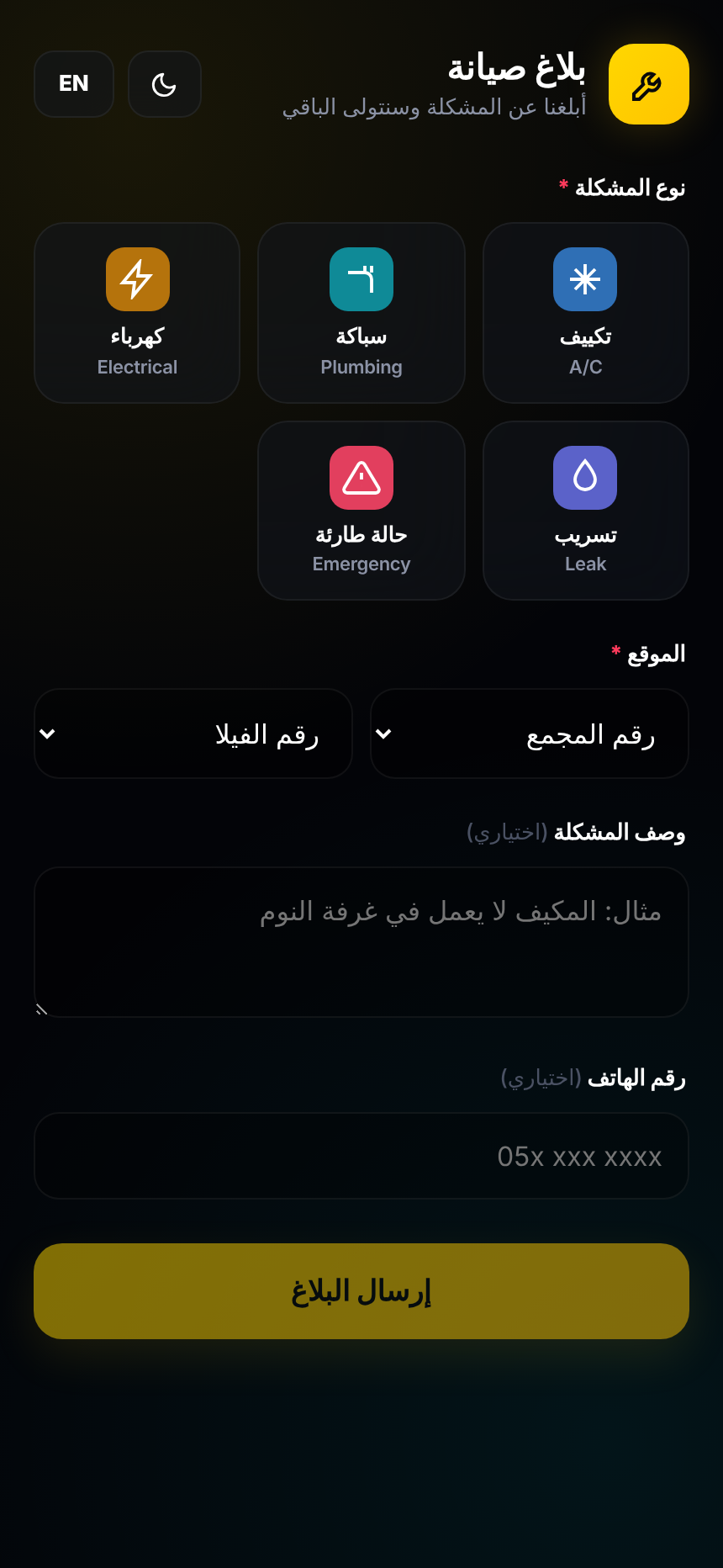
The supplied tenant page, shown 1:1—not a marketing reconstruction.
The boundary is deliberate. It keeps the product fast in the field, easy to support and clear about what it owns.
Capture jobs, route responsibility, preserve the audit trail, monitor response targets, expose repeat faults and export the record.
Service charges, payments, accounting, gate passes, photo attachments and custom third-party integrations. Data mirrors to a Google Sheet you own.
You receive your own Google project, database and Sheet. You are not one tenant inside somebody else’s platform.
The core project and data stay under credentials your organisation controls.
Every job, timestamp and note remains available in a format Excel can open.
If support ever changes, the app does not automatically switch off and the records do not move.
Never priced per villa. The setup covers the estate; the monthly tier covers how quickly support needs to answer.
Up to 300 units on one site, block and contractor mapping, your logo, up to 15 accounts and one on-site training session. Multiple sites, an Arabic staff interface or historical spreadsheet migration are quoted before work begins.
Standard is about AED 25 a day. Judge that against the administrator time currently spent reconstructing calls and retyping them into a spreadsheet.
Changing sites, contractors, job types, keywords and users is unlimited, immediate and included on every plan.
They need a number, another number and a fault word they already use. During setup, the exact words your team says—including Arabic, Urdu and Hindi terms—are added as recognised keywords.
The project and data sit in your own Google account. Nothing is hosted only on the supplier side, so your records remain with you and the system can be handed to another developer.
Not to log a job. Offline entries are held on the phone and sync when service returns. A connection is needed to see other people’s latest jobs and generate the report.
Keep it. TT3 mirrors data to a Google Sheet you own. The difference is that the sheet is filled at the moment the fault is found, by the person who found it, rather than reconstructed later.
The usual process is a mapping session for blocks, contractors and keywords, followed by configuration and on-site training. From agreement to live use is normally around two weeks, depending on stakeholder availability.
Yes, at any time. Jobs mirror to your Google Sheet as they happen, and the monthly report exports as a PDF.
No. TT3 records maintenance work and contractor performance; it does not handle money or accounting.
Ask. Product improvements go into one shared queue and, when built, ship to every customer. Private one-off versions are avoided because they create fragile, difficult-to-support systems.
Share the size of the estate and the number of contractors. You will get a direct answer on fit, likely setup scope and the sensible support tier.
No mailing list. No account creation. The button prepares a WhatsApp message using the two selections.